Showing posts with label OSX. Show all posts

Wednesday, May 13, 2015

Setup iTerm2, zsh, oh-my-zsh and powerline fonts on OSX

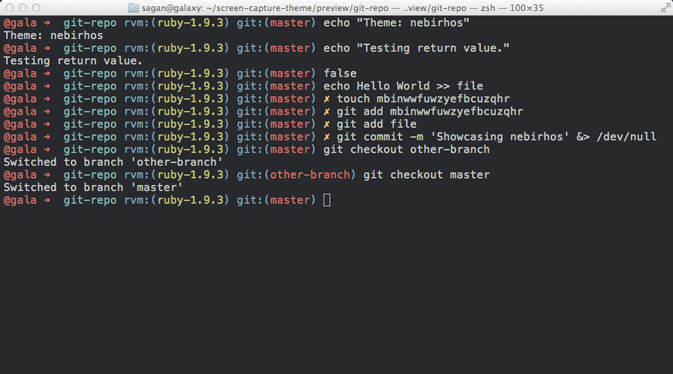
After waiting for a long time, I finally updated my Mac to OSX 10.10. Right after the installation, the usual tweaking process begins to make you feel at home. These are my notes to make the shell look good.
I wanted z-shell, oh-my-zsh and these modified powerline fonts to make the command prompt look cool.
If you want to follow these steps, it's recommended to have homebrew installed to install zsh-shell.

Ready, set, go!

Open your terminal and prepare to type.

iTerm2

The easiest way it to install iTerm2 with homebrew. Run this command:
brew install iTerm2

oh-my-zsh

Run this command curl -L https://raw.github.com/robbyrussell/oh-my-zsh/master/tools/install.sh | sh

powerline

Powerline is a project that provides tools to customize the status line and command prompt of several applications. To achieve this, they use special glyphs that are available through patched fonts. These are the powerline fonts. Download the font from here and install it by double clicking. This will open the Font Book application and install the font for you.

Configuration

Now it's time to put everything together.
  1. Open iTerm2
  2. Go to Preferences -> Profiles -> Default -> General and type /bin/zsh into the text field next to Command (this will use zsh instead of your default shell)
  3. Go to Preferences -> Profiles -> Default -> Text and change the Regular Font and the Non-ASCII Font to 11pt Inconsolata-dz for Powerline
  4. open ~/.zshrc with your favorite text editor and change ZSH_THEME to agnoster
That's it. Make sure to start/restart iTerm to see all the changes.

Resources

oh-my-zsh Powerline change osx shell

Wednesday, May 6, 2015

Electron mystery on OSX solved

Do I look like an idiot? I don't know. But I felt like one for the last 2 days.


2 days ago I started to look into on a great project idea, to replace the Brackets Shell with Electron. Great idea! I wanted to contribute and fix issues that crossed my way. But, I followed the given instruction to clone the repo and setup all dependencies. After everything was download and in the right place, I ran npm start to bring up Brackets in it's new electron shell. But that first attempt failed with this error:
> Brackets@1.3.0-0 start ~/develop/fun/OSS/brackets-electron
> electron .

~/develop/fun/OSS/brackets-electron/app/shell-config.js:13
r CONFIG_PATH = path.resolve(utils.convertWindowsPathToUnixPath(app.getPath("u
                                                                    ^
TypeError: app.getPath is not a function
    at Object.<anonymous> (~/develop/fun/OSS/brackets-electron/app/shell-config.js:13:71)
    at Module._compile (module.js:418:26)
    at Object.Module._extensions..js (module.js:436:10)

I was wondering, if there was something important missing in the setup instruction, I simply made a mistake or my system config was tricking me. After checking with the guys who started that effort, I was left with this weird error.

I started to research and looked for others having the same issue, but I couldn't find anything. Okay, it has to be my machine setup. Back at home, I started to setup everything on another machine to see if it works there. The result was the same! The error showed up on a different Macs, with a different OSX versions.

I went back to our slack channel and carefully mentioned, that I'm still not able to get it running yet. Someone replied, that I can install Electron globally and try it again. But this turned out to be a red herring. Nothing has changed and it was really frustrating, since nobody else seemed to have these issues on OSX. I promised them to help, but I could even review and test pull requests.

I did some more research and came across this great blogpost from Thorstenhans. He provided a boilerplate project for an app that uses Electron. I was so happy. I followed his instructions to create a clean app. Everything went fine and I was excited because it's using es6. Unfortunately, the result with Electron was the same.

I left a comment for the blogpost asking, if he has encountered this issue before. Nothing worked for me as expected. So, it must be my machine I concluded. But two machines at the same time?

I mentioned my inability to launch Electron on OSX, briefly in the slack channel for electron-brackets. I felt like an idiot at this point. Somebody who distracts everybody with some nonsense. Nobody had an idea what might help to resolve this misery to help me getting started.

Since the electron-brackets version on Linux seemed to work fine, I decided to pull my Linux VM out of the drawer and give it a try. I cloned the repo, installed everything and typed npm start at the console. Guess what? It worked! I was happy. That is awesome and I'm finally able to help.

But I wasn't happy that my day-to-day machine didn't play well with me. I had a conversation with Thorsten Hans (look at the comments here). He solved another mystery for himself along the way, but I didn't make any progress.

Long story short, I started to get rid of my nodejs installation, install nvm from scratch and hoped to resolve the issue. No luck. But then I inspected the environment variables for anything nodejs related and I found NODE_PATH. It seemed somehow messed up. This post recommended to undef NODE_PATH to solve another issue. But it helped me too. npm start is finally working and the biggest mystery, that let me look like an idiot was resolved.

Thanks

To Thorstenhans for the back and forth to help me resolve the issue. Thanks to Andrew MacKenzie to mention often enough, that the Linux version is doing a good job for him.

Monday, January 23, 2012

Upcoming Jenkins OSX installer changes

I was too busy with other things that prevented me from working on the Jenkins OSX installer recently. Since there are some reported issues with the installer, I'm going to address them in the next couple of days. First of all I'm going to provide a solution for the "data loss" situation that happened several times. This "data loss" situation I'm referring to, is the deletion of a modified jenkins preference file. It's never funny to loose data, even if it's preference data and there were changes specific to your machine.
The other issue is to move from a daemon user for the jenkins execution to a 'real' user. The issue with the daemon user is best described here. I already started to work on this feature and I'm currently testing the feature. Currently I don't have a good solution for migrating from daemon to real jenkins user. This is something I have to find a solution for.

Kohsuke Kawaguchi provided some good documentation for the usage of the Jenkins OSX installer. The document helps to find the available configuration settings, how to display and modify the configuration settings and how to start/stop the jenkins process manually.

So, stay tuned for the upcoming, live easing changes.
Thanks

Monday, August 22, 2011

Notable changes in Jenkins OS X installer 1.427

Okay, nearly every every week there is a new version of the installer available. With every Jenkins release you will also find a new installer for OS X. But that's nothing new. With release 1.427 it's time to tell a little bit about the recent changes in the installer. What else has been changed in the latest Jenkins release can be found here. The installer can be downloaded from here.

What's new in this release?

There were a lot of changes in the recent versions, but I'm going to mention them here too (since they have never been mentioned anywhere else)
  • Installation as launch daemon instead of launch agent. If you don't know the difference, here is a good explanation.
  • By default Jenkins will be installed as launch daemon, but the user can choose to not install it as launch daemon. In this case only the jenkins.war get's installed. Please start jenkins on your own.
  • There is a preference file available to easily tweak the Jenkins program arguments like JENKINS_HOME, prefix, httpPort, etc.
  • Documentation with instructions on how to change the arguments by modifying the preference file. The documentation will be installed and is available from /Library/Documentation/Jenkins or you can have sneak peak here.
When it comes to the installation process you will find something like this. More options than ever before. ;-)
Kudos to Sami Tikka for adding the recent improvements.

What's next?

There is currently one big improvements "work in progress": the PrefPane! This will allow you to easily modify the Jenkins settings, start and stop Jenkins, open the logfile, etc.
There is no planned release date for it, but I think it will be available before Christmas 2011.

You have ideas for improvement?

Let us know. We are happy to resolve issues that could ease your life dealing with Jenkins on OS X. The easiest way is to create a new ticket here. If you want to contribute some code, you can even do this by forking the repo on github and start working on it.